Skeleton Solver
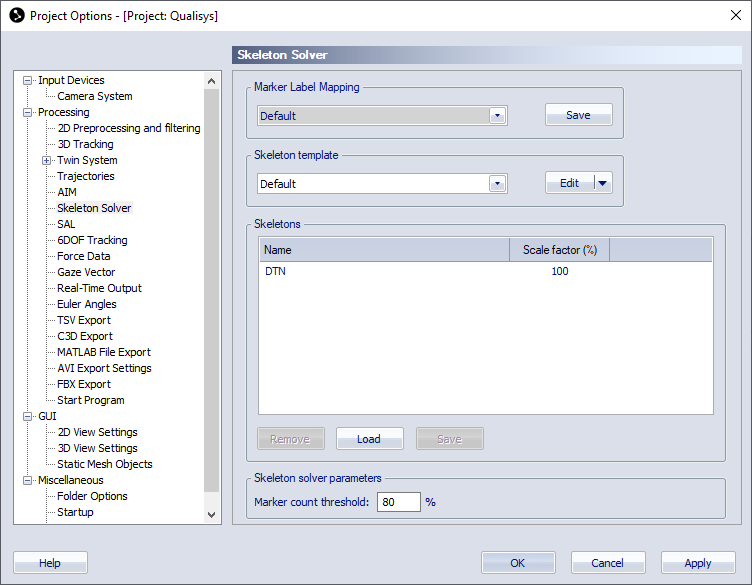
The Skeleton Solver page is used to manage the skeleton definitions used in the project. For more information on skeleton tracking, see chapter Tracking of skeletons.
-
Marker Label Mapping
Mapping of markers associated with a skeleton. See chapter Skeleton marker label mapping for how to use a custom marker mapping.
-
Skeleton template
Select template for global parameters used by the skeleton calibration. See chapter Skeleton template for how to use the Skeleton template.
-
Skeletons
List of skeletons loaded in the project. The column are:
-
Name
Name of the skeleton, corresponding to the used prefix of the trajectory labels.
-
Scale factor (%)
Scale factor of the skeleton in percent used for streaming and exporting skeleton data. For more information about the use of the scale factor, see chapter Scale factor.
-
-
The skeleton list can be managed using the following buttons.
-
Remove
Remove the selected skeleton.
-
Load
Load skeleton from QTM skeleton file.
-
Save
Save selected skeleton to QTM skeleton file. If you select multiple skeletons, each skeleton will be saved in a separate file.
-
-
Skeleton solver parameters
Options for the skeleton solver. The parameters for the optimization criteria can be set separately for real-time and post processing, or set using one of the presets. For more information about the use of the skeleton solver parameters, see chapter Skeleton solver parameters.
-
Marker count threshold
Set the threshold for how many Segment markers that needs to be identified in a skeleton, for the skeleton solver to calculate skeleton data. The percentage is calculated for all Segment markers in a skeleton.
-
Max iterations
Maximum number of iterations for the skeleton solve.
-
Factor
Factor to set tolerance for the skeleton solve.
-
Accuracy
Gradient tolerance for the skeleton solve.
-