Pretrigger
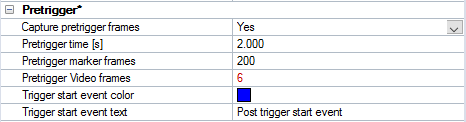
It is possible to use a pretrigger mode, so that actions can be captured that occurred before a trigger start event. The pretrigger mode is activated by setting Capture pretrigger frames to Yes. The pretrigger settings apply globally to the system. In pretrigger mode the cameras continuously update their buffer memories with a predefined number of frames until a trigger start event occurs. After the trigger start event, the pretrigger frames will be sent to the measurement computer. The trigger start event can be generated by an external trigger device, a wireless or software trigger, or by pressing the space key on the keyboard.
The following settings are available:
-
Capture pretrigger frames
Set to Yes for using pretrigger mode -
Pretrigger time [s]
Time to buffer data (in seconds) before the trigger start event. -
Pretrigger marker frames
Number of marker frames to buffer before the trigger start event. -
Pretrigger video frames
Number of video frames to buffer before the trigger start event.The number of video frames can differ between cameras dependent on their video capture rate, which can be set individually. If the number of pretrigger video frames is different when multiple cameras are selected, it will be indicated red.
-
Trigger start event color
Color used to label the trigger event -
Trigger start event text
Text label for the trigger start event
Pretrigger is also supported in combination with the following external devices:
-
Analog board USB-2533
For using pretrigger in combination with the USB-2533 analog board the use of an external trigger is required, see chapter Measurement with analog capture while using pretrigger for details on how to connect the external trigger device. The pretrigger option is not supported in combination with other any other external devices, such as digital force plates, eye trackers, EMG devices and A/V devices.
Make sure that the time between the start of the capture and the trigger event is long enough to capture all the pretrigger frames, i.e. check that the Status bar says ”Waiting for trigger”. Otherwise there will not be enough pretrigger frames to collect from the buffer.