Manus Gloves
The Manus Gloves settings are managed via the Manus Gloves settings page. For information about how to connect and set up MANUS gloves for use with QTM, see chapter Connecting Manus gloves.
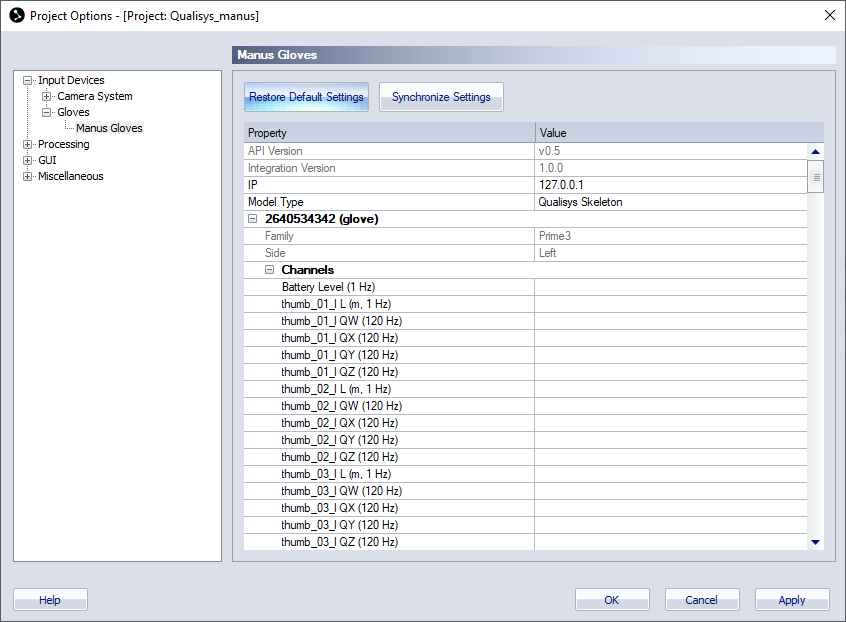
The Manus Gloves page contains the following buttons and a list with settings for the gloves.
-
Restore Default Settings
Restore the settings to their default values. -
Synchronize Settings
Synchronize changed settings with the device.
The settings list contains a top section with common settings and a section with the channels for the treadmill.
-
Common settings
The common settings are always visible.-
API version
The API version used when creating the integration. Hover over the version number to compare with the API version used by QTM. -
Integration version
The version number for the integration. -
IP
Enter the IP address for the Manus device. -
Model Type
Skeleton type used for the glove bindings.
-
-
Gloves
Gloves are indicated with their serial number and contain information about the glove type and data channels.