Kistler Force Plates
The Kistler device settings are managed via the Kistler Force Plates settings page. Once the Kistler devices are set up correctly, the force calculation can be defined under the force plate settings, see chapter Force plate settings.
For information about how to connect and set up Kistler digital force plates for use with QTM, see chapter Connecting Kistler digital force plates.
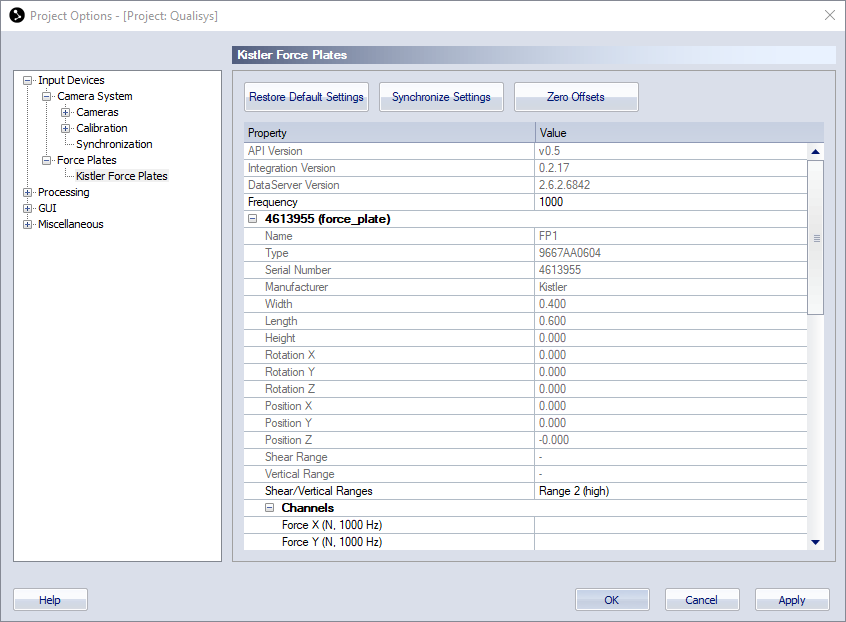
The Kistler Force Plates page contains the following buttons to communicate with the force plates and a list with settings for the force plates included in the configuration.
-
Reset Settings
Reset settings to their default values.
-
Sync Settings
Synchronize changed settings to the Kistler device. Sync Settings should be used when changing the Frequency setting.
-
Zero Offsets
Manually zero the connected Kistler force plates.
The force plates are automatically re-zeroed when starting a preview or when opening the capture dialog.
The settings list contains a top section with common settings and a section with individual settings for each force plate.
-
Common settings
The common settings are always visible.
-
API Version
The API version used when creating the integration. Hover over the version number to compare with the API version used by QTM.
-
Integration Version
The version number for the integration.
-
DataServer Version
The version number of DataServer.
-
Frequency
Enter the frequency for the force plates.
-
Vertical Threshold
Vertical threshold in Newtons. If the total vertical force is below the threshold, the moment values all return zero. If the vertical force is above the threshold, the normal calculated moments are returned.
-
-
Individual settings and information for each Kistler force plate
The individual settings are displayed for the Kistler force plates included in the configuration. Note that all of these settings are imported from the Kistler configuration file and cannot be changed in QTM.
-
Name, Manufacturer, Product, Model
Information about the Kistler force plate.
-
Width, Length, Height
Force plate dimensions.
-
Rotation X, Rotation Y, Rotation Z, Position X, Position Y, Position Z
Default Rotation and Position of the force plate. Note that the location must be set for each force plate on the Force data page.
-
Shear range, Vertical range
Range settings used for plates connected via the Kistler 5695 DAQ, as defined in the configuration file.
-
Shear/Vertical ranges
Select the force ranges for Kistler digital force plates.
-
Channels
The channels captured from the Kistler force plate with their respective unit and frequency.
-
Force X, Force Y, Force Z (N, frequency)
-
Moment X, Moment Y, Moment Z (Nm, frequency)
-
-