Force plate settings
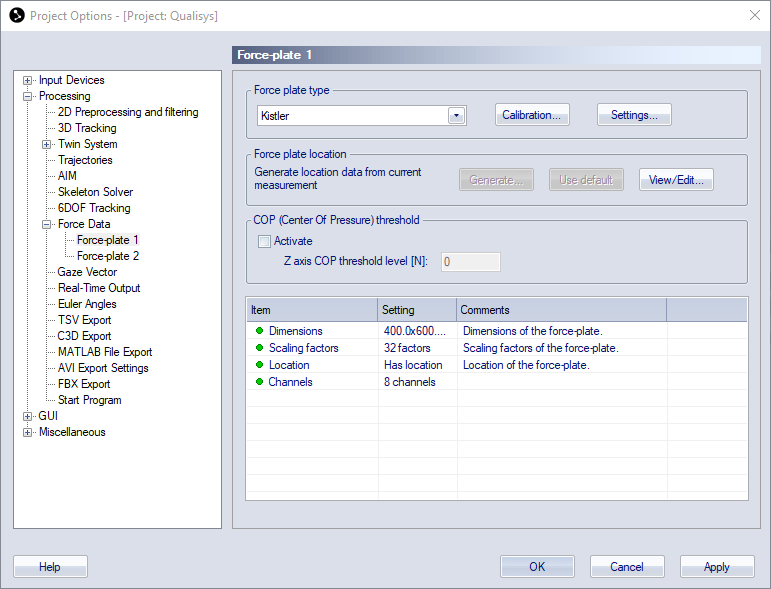
The settings for each force plate are found under the corresponding page. For example, settings for force plate 1 on the Force plate 1 page.
Force plate type

Under the Force plate type heading there is a drop-down box. The available force plate types depend on which force plate integrations you have installed.
-
For digitally integrated force plates the type cannot be changed and the Calibration and Settings options are controlled automatically. For more information about the digital integrations see chapter Digital force plate integrations.
-
For analog integrated force plates, the Calibration and Settings options depend on the force plate type. For a detailed description, see the instructions for the specific force plates in chapter Connection of analog force plates.
In addition, generic settings are available for connecting custom analog force plates or for force data imported from C3D files. For a detailed description, see chapter Generic force plate options.
Force plate location

To be able to view the force vectors in the same coordinate system as the motion capture, the location of the force plate must be specified. The available settings are the same for all force plate types and are done under the Force plate location heading on the Force plate page. The force plate location will be visualized as a blue-purple rectangular tile in the 3D view window.
The three buttons have the following functions:
-
Generate
Automatically generate the force plate location from a capture with markers placed in the corners of the force plate, see chapter Generate force plate location from a capture.
-
Use default
Use default force plate location.
-
View/Edit
Manually review and optionally edit force plate corner positions, see chapter Manual revision and specification of force plate location.
COP (Center Of Pressure) threshold

The Center Of Pressure (COP) is the position of the center of the pressure on the force plate.
The COP (Center Of Pressure) threshold heading on the Force plate page contains settings for the COP threshold. When the vertical load on the force plate is below the threshold level, the COP will not be calculated and the force vector will not be shown in QTM.
-
Select the Activate check box to activate the COP threshold filter.
-
Enter the Z axis COP threshold level in Newtons. The Z axis refers to the force plate coordinate system, which means that it is the vertical force which is used as a threshold for the filter, independent of the orientation of the global coordinate system.
Force data is not calculated when the vertical load on the force plate is below the threshold level. If needed, forces can always be recalculated without threshold or with a different one.
Force plate settings status window
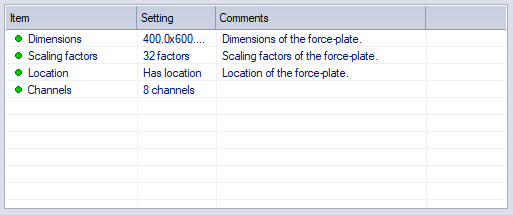
At the bottom of the Force plate page there is a Settings status window, which shows the status of the settings of the force plate. It uses the same notification icons as under the Camera system settings heading on the Camera system page. The settings that are shown are Dimensions, Scaling factors (Calibration for the AMTI force plates), Location and Channels.