Delsys Trigno QTM settings
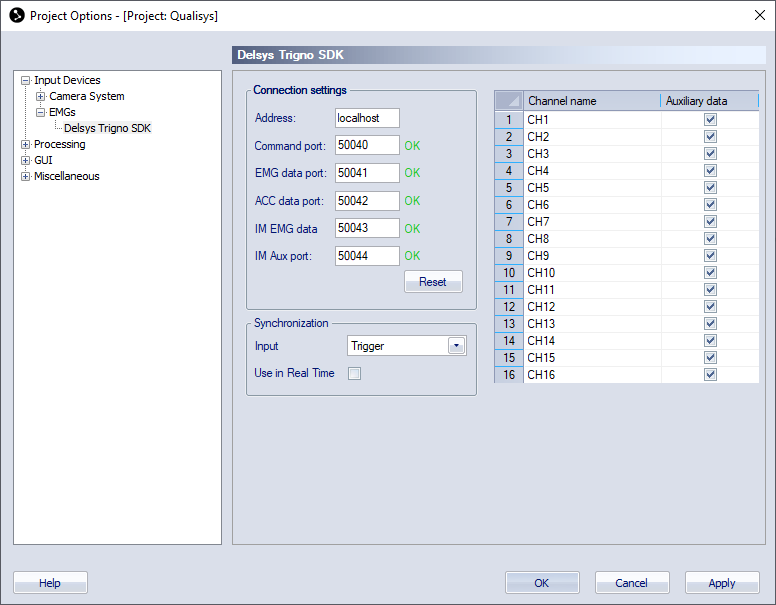
The Delsys Trigno SDK page, with settings for the Delsys Trigno EMG, is included in the Project options dialog when Delsys Trigno is activated on the Input Devices page. To use Delsys Trigno you need to install the drivers that can be found on the Download device drivers link on the Input Devices page. For more information about how to use Trigno, see chapter Delsys Trigno EMG (SDK legacy integration).
The settings page contains the different options for the Trigno EMG. To change any Trigno settings that are not included on the page, go to the Trigno Control Utility.
The following settings are available for Delsys Trigno:
-
Connection settings
-
Address
The IP address of the computer that is running the Trigno Control Utility. The default is localhost which is the same as the QTM computer. -
Command port, EMG data port, ACC data port, IM EMG data and IM Aux port
Ports used to communicate with the Trigno Control Utility. The defaults are 50040, 50041, 50042, 50043 and 50044.
-
-
Synchronization settings
-
Input
Select the synchronization input. The selected input depends on which signal from the Qualisys system is used as synchronization signal. The options are:-
Trigger: This option should be selected when the trigger button is connected to the Delsys Trigger Module as described in chapter Trigno trigger connection. When this option is selected, the trigger delay from the Qualisys system is compensated for.
-
Measurement Time: This option should be selected when the synchronization or measurement time output of the Qualisys system is connected to the Delsys Trigger Module as described in chapter Trigno Measurement Time connection
-
-
Use trigger in real time
The Use trigger in real time option activates the use of the trigger button in Real-time mode. When the option is activated the real-time will not start until you press the trigger button. This is to ensure the synchronization in real-time. If you do not use the real-time output you can uncheck the option and then you only need to press the trigger button before the measurement.Activate the Use trigger in real time option when the setup is finished to minimize the number of times you have to press the trigger button.
-
Channels
-
Channel name
Activate the EMG and Acceleration sensors and enter a name for the channels. Make sure that the channel number matches those that are active in the Trigno Control Utility. The name of the EMG channel is the same as the Channel name. The auxiliary data channels have the channel name with a suffix, for example _ACC_X, _ACC_Y and _ACC_Z for the acceleration data. -
Auxiliary data
Check this option for the channels for which you want to retrieve auxiliary data from the sensors (e.g., acceleration, gyro, magnetometer). If you do not need the auxiliary data, uncheck it to reduce the amount of analog data in the QTM files.
-