Description of Arqus cameras
Arqus camera: front side
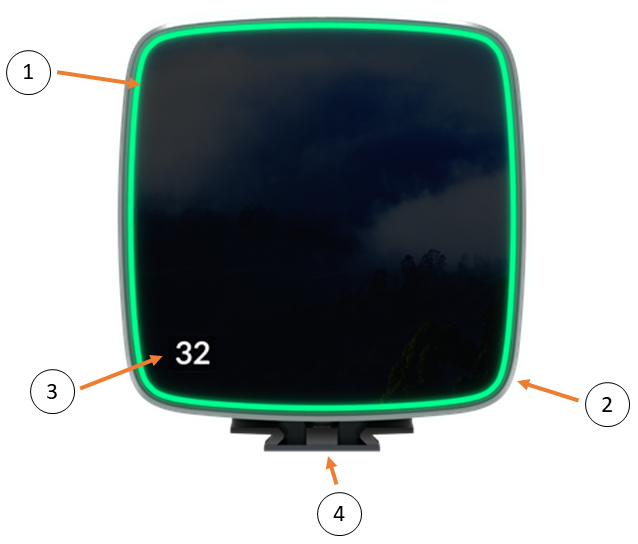
-
LED ring
LED ring for camera identification and indication of status during startup sequence.-
Green light: Active camera indicator (see Identifying the cameras with the identification tool).
-
Pulsing green light: Camera system being calibrated.
-
Amber light: Camera is booting.
-
Pulsing amber light: Camera is waiting for IP address.
-
-
Measurement status indicator
-
Green light: The system is ready to start a measurement.
-
Yellow light: The system is measuring.
-
Flashing green light: The camera is synchronizing to the master device.
-
Flashing red light: Error signal.
-
-
Camera display
-
Display of camera ID.
-
-
Mounting plate
-
Quick release for Manfrotto and Arca Swiss, two 1/4'' camera mounts.
-
Arqus camera: back side
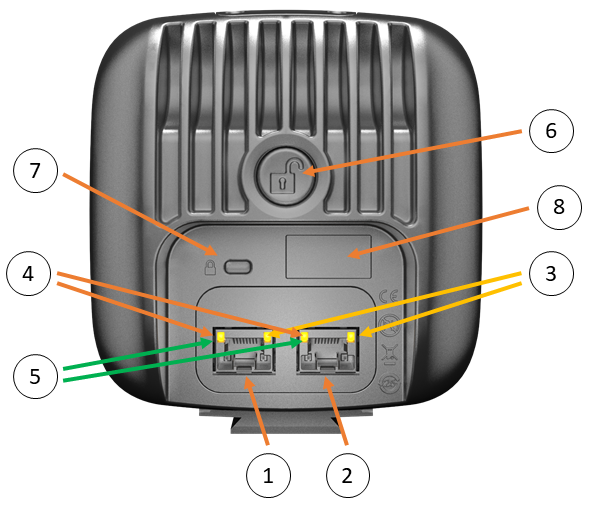
-
Left daisy-chain data/power port
Combined Power/Gigabit Ethernet connector. -
Right daisy-chain data/power port
Combined Power/Gigabit Ethernet connector. -
Left/right port Link/Activity indicator
Shows the status of the ethernet connection. Fixed yellow light means that a carrier signal has been sensed and that the connection is up. Flashing yellow light indicates that data is received and/or transmitted. -
Left/right port Gigabit link indicator
Lit orange when Gigabit Ethernet link is established. -
Left/right port Power indicator
Lit green when the camera is powered on. -
Strobe unlock button
Press/release to unlock/lock the strobe mechanics. -
Kensington Security Slot
Slot for connecting a security cable. -
Camera identification
This label shows:-
The serial number of the camera.
-
The product number.
-
The Ethernet Mac address.
-