Trajectory Editor window menu
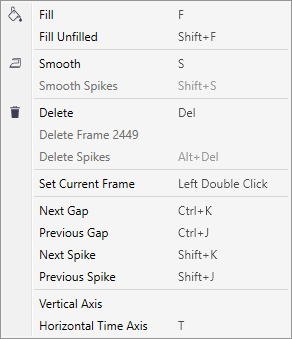
The Trajectory Editor window menu contains options for the selected trajectory. The menu can be accessed by right-clicking in the plot area of the Trajectory Editor.
The following options are available:
-
Fill
Fill all gaps included in the selected frame range using the current gap fill settings. -
Fill Unfilled
Fill all unfilled gaps included in the selected frame range using the current gap fill settings. -
Smooth
Smooth the data included in the selected frame range using the current smoothing settings. -
Smooth Spikes
Smooth the spikes included in the selected frame range using the current smoothing settings. -
Delete
Delete the data included in the selected frame range. -
Delete Frame xxx
Delete the frame at the mouse pointer position. -
Delete Spikes
Delete spikes included in current selection. Only the frames with acceleration values above the current acceleration threshold will be deleted, excluding the additional margins. -
Set Current Frame
Set current frame to mouse pointer position. -
Next Gap
Select next gap. -
Previous gap
Select previous gap. -
Next Spike
Select next spike. -
Previous Spike
Select previous spike. -
Vertical Axis
Show/hide vertical axis information. -
Horizontal Time Axis
Toggle between frame or time (seconds) units for the horizontal axis.