Adding extra markers to a skeleton
Extra markers or rigid bodies can be placed on the subject and included in the skeleton definition. This option can be useful for improving the tracking of the segments of the skeleton or for creating unique marker configurations when capturing multiple actors. Follow these steps to add extra markers to a skeleton:
-
The marker label or rigid body name must have the same prefix as the skeleton, e.g., JD_... for a skeleton with name JD. The prefix should end with an underscore; the first underscore in the label will be considered as the separator for the skeleton name.
-
The marker or rigid body will be automatically assigned to a segment based on its placement. However, if you want to specify a specific segment to which the marker will be associated you can include the segment name in the marker label, e.g., JD_Hips_... for a marker associated with the Hips segment of the skeleton definition of JD. The assignment of extra markers can also be altered via a dialog when calibrating the skeleton, see chapter Assigning extra markers to a segment.
The use of extra markers will depend on your camera configuration and the type of movements you want to capture. Refer to the respective marker set guides for recommendations for extra markers.
Assigning extra markers to a segment
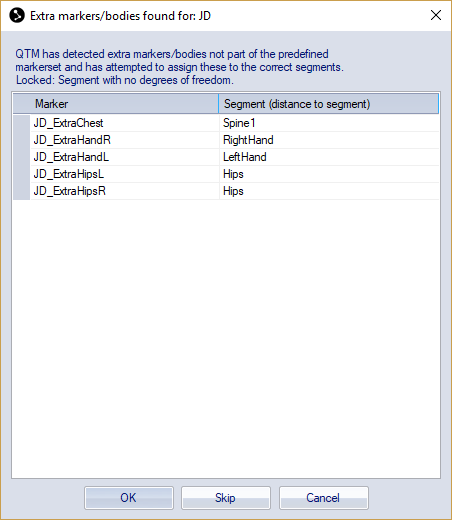
When calibrating a skeleton with extra markers or rigid bodies, QTM displays a dialog showing the assigned segments for each extra marker or rigid body. If needed, you can change the assignment to a different segment, or specify None if the marker or rigid body should not be used for skeleton solving. The functions of the buttons are:
-
OK: Approve the chosen segment assignments and proceed with calibration and solving.
-
Skip: Proceed with calibration and solving without using the extra markers. The extra markers will not be included in the skeleton definition.
-
Cancel: Interrupt the calibration and solving process.
When using the Qualisys Sports Marker Set, the segments RightToeBase, LeftToeBase, Spine1, Spine2 and Neck are locked. Extra markers added to these segments will primarily affect their respective (unlocked) parent segments and that way contribute to the skeleton solving.