Tobii data in QTM
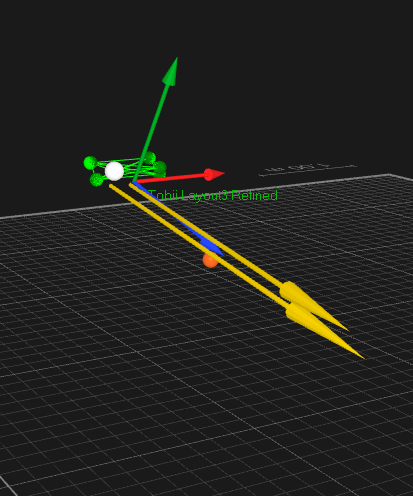
The Gaze vector data is displayed in the 3D view of the window as a vector, for example color and length can be modified on the 3D view settings page in Project options.
There are two different types of data available for the Tobii eye trackers in QTM.
-
The eye tracker device data.
-
For Tobii Pro Glasses 3, the device data is stored in QTM as analog data, containing all data channels retrieved from the eye tracker device.
-
-
The gaze vector data.
Eye Tracker data
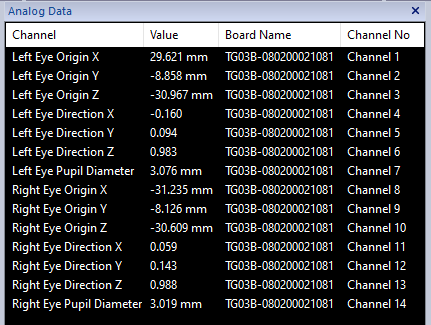
The eye tracker data from Tobii Pro Glasses 3 devices can be viewed in a Data Info window as Analog data. The eye tracker data for Tobii Pro Glasses 3 includes:
-
Lef/Right Eye Origin X/Y/Z
The position of the pupil in mm in local coordinates of the glasses.
-
Lef/Right Eye Direction X/Y/Z
The direction of the gaze vector (normalized) in local coordinates of the glasses.
-
Lef/Right Eye Pupil Diameter
The pupil diameter in mm.
Gaze vector data
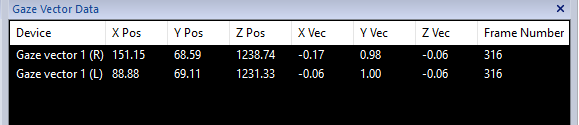
The gaze vector is provided by the Tobii recorder and then transformed in QTM to global 3D coordinates through the pose of the associated rigid body. The gaze vector data can be viewed in a Data Info window as Gaze Vector data.
The gaze vector data includes:
-
Device
The device is the name of the Gaze vector. (L) and (R) stands for left and right eye.
-
X/Y/Z Pos
This X, Y and Z position (mm) of the origin of the Gaze vector in the Global coordinate system.
-
X/Y/Z Vec
The X, Y and Z value (normalized) of the Gaze vector in the Global coordinate system.
-
Frame Number
Te frame number of the Tobii data. Since the frame rate of the Tobii data is mostly lower than the marker data, it means that the Tobii data is updated less often than the marker data.